Jobber vs Tradify for Canadian Trades (2026): Price, Xero Sync, Who Wins
Disclosure: this post contains affiliate links. If you sign up through one, we may earn a commission at no extra cost to you. We only recommend tools a CPA has reviewed from the vendor's own pages.
Jobber or Tradify: which job-management app should a Canadian trades business use?
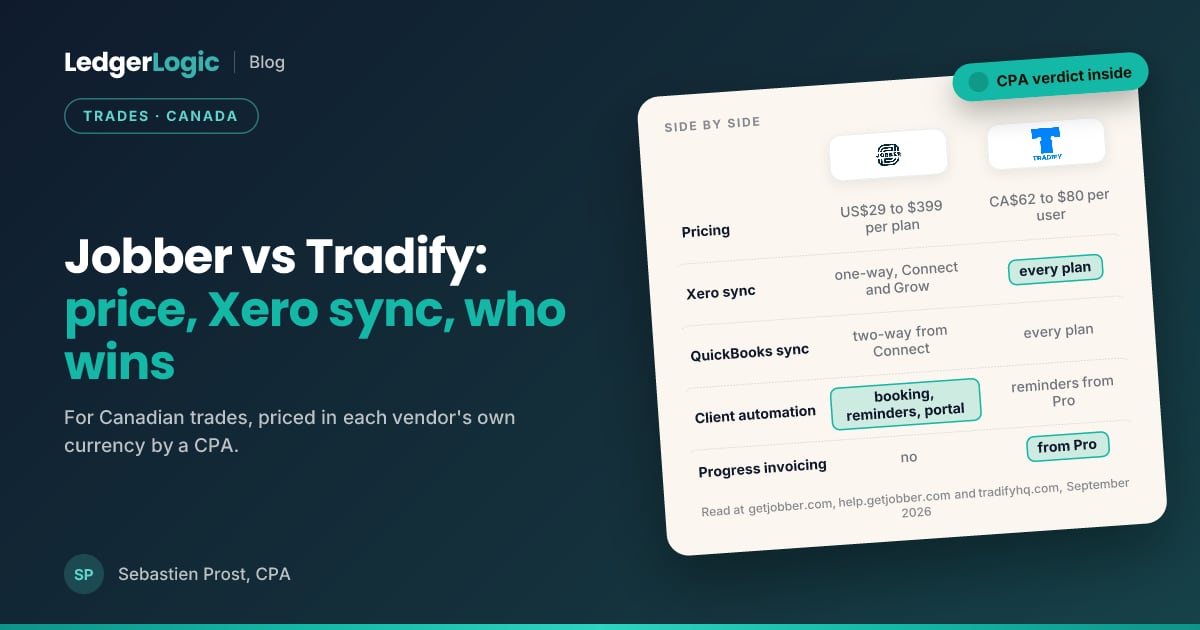
Jobber if your books are in QuickBooks Online and you want the client hub doing the work: online booking, reminders, follow-ups, automatic payment collection and a client portal, with Jobber Payments in Canada. It is priced per plan in US dollars for one person (Core $29, Connect $99, Grow $149, Plus $399 a month billed annually) and steps up by team size: Connect is $149 for 2 to 5 people, $229 for 6 to 10 and $299 for 11 to 15, Grow is $229, $299 and $399 on the same bands, and Core is listed for one person only. Tradify if your books are in Xero (it syncs with Xero and QuickBooks Online on every plan), if you want one Canadian-dollar price per user (Lite $62, Pro $68, Plus $80), or if you invoice on progress and track supplier bills. Solo: US$29 vs CA$62. Three people: US$149 vs CA$204. Six people: US$229 vs CA$408. Ten people: US$299 on Grow vs CA$800 on Plus. Both have a 14-day free trial and no discount code. Verified at both vendors, 7 September 2026, Jobber pricing re-read 11 September 2026.
At a Glance
Jobber and Tradify are the two job-management apps Canadian trades ask us about, usually in the same breath as "which one talks to my accounting software". They overlap almost completely on the core loop (quote, schedule, dispatch, invoice, get paid) and differ on the three things that decide the purchase: how they are priced, which ledger they sync to, and what the client sees. Both pay us a referral fee if you sign up, which is why every figure below comes from getjobber.com and tradifyhq.com rather than from either sales team.
Published September 2026. Every price and feature below was read at getjobber.com/pricing, getjobber.com/features and tradifyhq.com/en-ca/pricing on 7 September 2026.
The Short Answer: Jobber or Tradify?
Jobber if your books are in QuickBooks Online and you want the client hub working for you: online booking, appointment reminders, quote and invoice follow-ups, automatic payment collection, two-way SMS on Grow, and a portal where the client approves and pays. It is priced per plan in US dollars, Core US$29 to Plus US$399 a month billed annually, with Core listed for one person only and Connect, Grow and Plus stepping up by team size. Tradify if your books are in Xero (it syncs with Xero and QuickBooks Online on every plan), if you want one flat Canadian-dollar price per user (Lite CA$62, Pro CA$68, Plus CA$80 per user per month), or if you claim on progress and track supplier bills against jobs. A solo operator pays US$29 at Jobber or CA$62 at Tradify; a three-person crew pays US$149 or CA$204; a six-person crew pays US$229 or CA$408. Both offer a 14-day free trial. Tradify also gives 50% off for 3 months through our link (applied on its sign-up form with nothing to type; terms on our Tradify deal page), and Jobber has no partner discount, only its own buy-now offer shown inside the trial (20% off a monthly plan for 3 months, or 13% off annual, with a countdown).
Jobber vs Tradify Side by Side
| Feature | Jobber | Tradify |
|---|---|---|
| Pricing model | Per plan, US dollars, stepped by team size (1, 2 to 5, 6 to 10, 11 to 15); Core listed for one person only | Per user, Canadian dollars; every user pays the plan price |
| Plans | Core US$29, Connect US$99, Grow US$149, Plus US$399 a month billed annually (US$49 / $139 / $199 / $499 monthly) | Lite CA$62, Pro CA$68, Plus CA$80 per user per month; Custom by request |
| Team-size bands and add-ons | Connect US$149 for 2 to 5 people, US$229 for 6 to 10, US$299 for 11 to 15; Grow US$229, US$299 and US$399 on the same bands; Plus US$449 for 6 to 10 and US$529 for 11 to 15; Marketing Suite US$99, AI Receptionist US$29, Pipeline US$49 | Instant Website CA$16 a month |
| Accounting sync | QuickBooks Online two-way from Connect; Xero one-way (Jobber into Xero) on Connect and Grow | Xero and QuickBooks Online, every plan |
| Quoting | Quotes on every plan; optional line items, images and upsells on Grow; automated follow-ups from Connect | Quoting and pricing tools on every plan; quote options and templates from Pro |
| Scheduling | Drag-and-drop calendar, routing, checklists from Connect, automatic time tracking on Grow | Scheduling with Google Calendar sync on every plan; timesheets and subcontractor scheduling from Pro |
| Client-facing automation | Online booking, reminders, follow-ups, client portal, two-way SMS on Grow, AI Receptionist on Plus | Appointment reminders, inquiry forms and communications history from Pro; service reminders on Plus |
| Payments | Jobber Payments in Canada: cards, bank, Tap to Pay; 2.9% + 30c cards, 1% bank published; automatic collection from Connect | Online payments on every plan through a connected provider |
| Progress invoicing and bills | No | Progress invoicing and bill tracking from Pro; purchase orders and bulk invoicing on Plus |
| Job costing | Grow and up; automated on Plus | Job service reports and reporting on Plus |
| AI | AI Receptionist add-on (included on Plus) | SmartRead for bills and SmartWrite on Plus |
| Free trial | 14 days on Grow, no credit card | 14 days, all features |
| Company | Edmonton, founded 2011; 400,000-plus service pros | Auckland, founded 2013 |
| Offer through our link | None; direct link | None |
Try Jobber free for 14 days, full Grow access, no card
Quotes, scheduling, invoicing, online booking and automated reminders for home-service crews, with Jobber Payments in Canada and a two-way QuickBooks Online sync from Connect. Prices published in US dollars from $29 a month; Jobber runs no discount code.
What each costs at 1, 3 and 6 people
Jobber's prices are US dollars billed annually; Tradify's are Canadian dollars per user. The table keeps each in its own currency on purpose: converting Jobber at today's rate would put a number on this page that is wrong by next month. Do the conversion yourself on the day you decide.
| Team | Jobber (USD, billed annually) | Tradify (CAD, monthly) |
|---|---|---|
| 1 person, quotes and invoices only | Core US$29 | Lite CA$62 |
| 1 person, wants reminders and QuickBooks sync | Connect US$99 | Lite CA$62 (Xero or QuickBooks sync included) |
| 3 people on Connect / Pro | US$149 (the 2 to 5 band) | CA$204 (three at CA$68) |
| 6 people on Connect / Pro | US$229 (the 6 to 10 band) | CA$408 (six at CA$68) |
| 10 people on Grow / Plus | US$299 (the 6 to 10 band) | CA$800 (ten at CA$80) |
The pattern is plain: Tradify is the simpler bill and the better price for one person who needs the Xero sync, and Jobber gets cheaper per seat the larger the crew, because one band price covers up to five, ten or fifteen people. Month-to-month billing at Jobber costs more (Connect US$139, Grow US$199) and the annual plan is billed for the year upfront.
Jobber: The Client Hub Is the Product
Jobber was founded in Edmonton in 2011 and reports more than 400,000 service pros across 50-plus industries. What you are paying for from Connect upward is the part the client sees: online booking, automated appointment reminders and "on my way" texts, quote and invoice follow-ups that go out on their own, automatic payment collection, and a client portal where the customer approves the quote and pays the invoice. Grow adds quotes with images and optional line items so the client picks the upgrade, job costing against the quote, automatic time tracking and two-way SMS. Plus bundles the Marketing Suite, Pipeline and the AI Receptionist, with five users at $399 and fifteen at $529. Jobber Payments is available in Canada with card, bank and Tap to Pay options and payouts on a two-business-day rolling window; the pricing page publishes 2.9% plus 30 cents on cards and 1% on bank payments, and your Canadian rates appear in Settings. The accounting sync is QuickBooks Online only, two-way, from Connect; Xero connects one way (Jobber into Xero) on Connect and Grow, through an app built by Xero. Prices are in US dollars with no Canadian list. Start the 14-day Jobber trial, no card required.
Tradify: Per User, in Canadian Dollars, Synced to Xero
Tradify was founded in Auckland in 2013 and publishes a Canadian price list: Lite CA$62, Pro CA$68 and Plus CA$80 per user per month, with a Custom tier by request and an Instant Website add-on at CA$16. Every plan, including Lite, includes job management, scheduling with Google Calendar sync, quoting with pricing and markups, invoicing, online payments, email tracking and accounting sync with Xero and QuickBooks Online. Pro is where most crews land: custom branding, inquiry forms, communications history, job photos and files, recurring jobs and templates, appointment reminders, quote options, progress invoicing, bill tracking, timesheets and subcontractor scheduling. Plus adds SmartRead for supplier bills and SmartWrite (both AI), service reminders, purchase orders, bulk invoicing, kit bundles, staff activity history and job service reports. The trial is 14 days with every feature on. Because it is priced per user, a six-person crew pays six times the plan price, which is where the comparison turns.
The Xero Question Decides More Than the Price
Ask which accounting system your bookkeeper works in before you compare features. On QuickBooks Online, Jobber's two-way sync (clients, invoices, payments) from Connect is the cleanest field-to-ledger flow we see in Canadian trades books. On Xero, Jobber has a one-way connection built and maintained by Xero (Connect and Grow plans): clients, products, invoices and their payments flow from Jobber into Xero, and nothing flows back, so a Xero shop still reconciles in Xero rather than in Jobber. Tradify syncs with Xero on Lite, so a Xero business gets the integration at CA$62 a user. If you have not chosen an accounting system yet, that choice is the harder one to reverse; our Canadian accounting software price index makes it.
What the Client Sees
Jobber's advantage is everything that happens without the office picking up the phone: booking, reminders, follow-ups, payment collection, the portal, and on Grow a texting thread with each client. For a residential service business with dozens of small jobs a week, that automation is the reason to pay US$99 or more. Tradify covers reminders, inquiry forms and quote options from Pro, and its strength runs the other way, toward the job itself: progress claims, supplier bills, purchase orders and subcontractors, which is what a renovation or commercial contractor needs and a lawn-care crew does not.
Who Should Pick Which
Jobber: home-service crews (lawn and snow, cleaning, HVAC, plumbing, electrical, painting, pest control) on QuickBooks Online, with three or more people who need the app and clients who expect to book and pay online. Tradify: trades on Xero, solo operators and small crews who want one Canadian-dollar price per user, and contractors who invoice on progress and buy materials against jobs. Either: pair it with payroll that remits to the CRA and receipt capture for fuel and supplies; neither app files GST/HST or runs payroll. Our payroll price index and the Dext offer cover that side.
If Neither Fits
A one-person operation that only needs invoices may be better served by an accounting app with quoting built in; FreshBooks is the Canadian-priced option there. A business that needs full accounting inside the job app should look at the accounting software comparison first and pick the job app second. And once the crew is on payroll, Wagepoint remits to the CRA and syncs to both QuickBooks Online and Xero.
Frequently Asked Questions
- Is Jobber cheaper than Tradify in Canada?
- For a solo operator, yes: Jobber Core is US$29 a month billed annually against Tradify Lite at CA$62. For a crew the currencies and models diverge: Jobber charges per plan with the price stepping up at 6 and 11 people, Tradify charges per user in Canadian dollars. A three-person crew pays Jobber Connect US$149 (the 2 to 5 band) or Tradify Pro CA$204; a six-person crew pays Jobber Connect US$229 (the 6 to 10 band) or Tradify Pro CA$408. Convert Jobber at the day's rate before you compare; at three people the two land close once converted, and Jobber pulls ahead from six because one band price covers the whole crew.
- Does Jobber work with Xero?
- Not natively. Jobber's integrations page lists QuickBooks Online (from the Connect plan), Xero (one-way, Jobber into Xero, on Connect and Grow, maintained by Xero), Zapier, Stripe, CompanyCam, FleetSharp and Mailchimp. Tradify syncs with both Xero and QuickBooks Online on every plan, including Lite, which is the single biggest reason a Xero business picks it.
- Is Jobber Canadian?
- Yes. Jobber was founded in Edmonton in 2011 and has offices in Canada and the United States, though it publishes its prices in US dollars. Tradify was founded in Auckland, New Zealand, in 2013 and publishes a Canadian-dollar price list for Canada.
- Which one handles payments in Canada?
- Both take online payments on every plan. Jobber Payments is available in Canada per Jobber's help centre, with card, bank and Tap to Pay options and payouts on a two-business-day rolling window; the published rates are 2.9% plus 30 cents on cards and 1% on bank payments, with Canadian rates shown in your account. Tradify lists online payments on Lite and up; its processing fees are set by the payment provider you connect.
- Which is better for progress invoicing and supplier bills?
- Tradify. Progress invoicing, bill tracking, purchase orders (on Plus) and subcontractor scheduling are built for contractors who claim on stages of a job and buy materials against it. Jobber invoices per job or visit and does job costing from Grow, but has no progress claims or supplier-bill tracking.
- Is there a Jobber or Tradify promo code?
- Not one you type, but Tradify does discount through our link: sign up through it and the form arrives with the discount attached, 50% off the subscription price for your first 3 months on any plan after the 14-day free trial (verified September 2026, terms on our Tradify deal page). Jobber has no partner discount: its 14-day trial gives full Grow-plan access with no credit card, and inside the trial Jobber shows its own buy-now offer with a countdown, 20% off a monthly plan for 3 months or 13% off an annual plan, which is Jobber's offer rather than ours. The coupon codes on third-party sites do not apply at checkout.
- Which has the better mobile app for the crew?
- Both are mobile-first. Jobber's app is rated 4.8 on the App Store across more than 13,000 reviews and 4.5 on Google Play, and adds two-way SMS with clients on Grow. Tradify's app covers scheduling, timesheets, job photos and quoting from Pro. Try both on the trial with one technician before you decide; the crew's opinion of the app matters more than the office's.
- Can I switch from one to the other later?
- Yes, but it is a project: clients, quotes and job history export as spreadsheets and re-import, and your accounting integration has to be rebuilt. Decide on the accounting system first (QuickBooks Online or Xero), because that choice narrows the field to one of these two and is far harder to change later than the job-management app.
Still deciding? Read the full Jobber Canada review.

Sebastien ProstCPA, Ex-CRA
Licensed CPA with 10+ years of experience, including work with the Canada Revenue Agency. Founder of LedgerLogic, a cloud accounting firm serving Canadian SMEs. Xero Certified Advisor.